Adapting Existing System Components for Usage with AI
Primary Goal
Pull data from a component I previously created to make component usage and context clear for AI agentic workflows.
My Process
Design systems are now software infrastructure that AI agents rely on, but many companies are struggling to use their existing component architecture within AI workflows.
Agents lack the context that design system teams have been training humans on for many years, so it makes sense to convert that context into intentional documentation files that are easy for agents to parse and update. Creating a collection of component context files that can easily be navigated by an AI agent via a central guidelines file allows the agents to parse only the component data they need for a particular task, maximizing efficiency.
Gathering Context for a System Component
In this sample project, I pulled from a system I designed for PUMA prior to AI tooling being on the market. I integrated context from both the design system file in Figma and the design system's documentation site using a custom AI skill I created, and Figma Console MCP, to generate a component markdown file covering key detail categories:
- Sub-component Inventory
- Usage Rules
- Props Reference
- Spacing / Layout Conventions
- Accessibility Requirements
Collapsible Component
When I designed and built the Collapsible component for the PUMA system it was intended as a dual use component - stand-a-lone for showing and hiding individual content sections and used in a coordinated collection within the Accordion component to manage group level spacing and active state. The Collapsible component is also a good sample for this flow because in addition to being a component that can be a sub-component, it also has multiple sub-components of its own with configuration options. Essentially, its usage requires clear rules to separate a "Collapsible" from an "Accordion", and ensure key sub-components are always included — making it a useful test of the skill I created in terms of capturing that nuance.
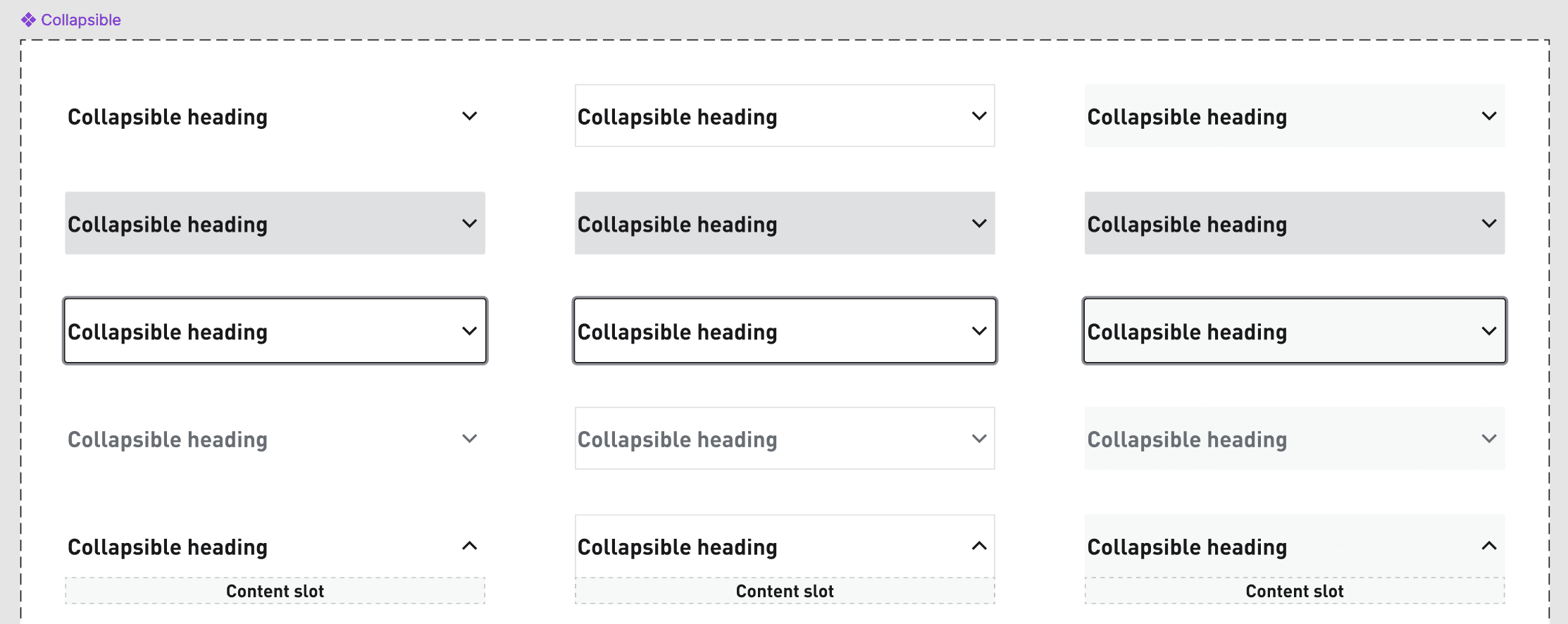
The skill passed the test and generated comprehensive documentation on the collapsible component that was able to be refined based on feedback to condense its output. In skill building and agentic flows, much like design and engineering more generally, iteration and refinement is the real powerhouse of the process.
# Collapsible Component Guidelines

---

## 1. Sub-component Inventory

| Component | Import Path | Primary Use Case |
|-----------|-------------|-----------------|
| `CollapsibleRoot` | `import { CollapsibleRoot } from "@global-ecom/nitro-uds/elements"` | Container that manages open/closed state for a collapsible section |
| `CollapsibleTrigger` | `import { CollapsibleTrigger } from "@global-ecom/nitro-uds/elements"` | Clickable toggle that shows/hides the content area |
| `CollapsibleContent` | `import { CollapsibleContent } from "@global-ecom/nitro-uds/elements"` | The hidden/revealed detail content area |
| `CollapsibleChevron` | `import { CollapsibleChevron } from "@global-ecom/nitro-uds/elements"` | Rotating icon that visually indicates open/closed state |

---

## 2. Usage Rules

**Do:**
- Use `CollapsibleRoot` as the outermost wrapper — all other parts must be nested inside it
- Always include a text label and `CollapsibleChevron` inside `CollapsibleTrigger` — the chevron must be nested inside to auto-rotate on state change
- Optionally add description text or a left-aligned accent icon inside `CollapsibleTrigger`
- Use `defaultOpen={true}` to render the collapsible open on initial mount (uncontrolled)
- Pair `open` with `onOpenChange` for controlled state management
- Wrap detail content in a `Card` component to manage inset spacing rather than relying on `CollapsibleContent`'s `inset` prop
- Use `asChild` on `CollapsibleTrigger` when you need to apply collapsible behavior to a custom button element
- Use `useCollapsibleContext()` hook when building custom child components that need access to open/closed state
- Use `Accordion` when displaying a stack of related collapsible sections — don't chain multiple `CollapsibleRoot` manually
- Set `hover="none"` on `CollapsibleTrigger` when applying fully custom hover styles via `className`
- Use `fill` and `outline` together on `CollapsibleRoot` for a bordered, filled trigger appearance

**Don't:**
- Don't use a raw `<button>` or `<div>` as the toggle — use `CollapsibleTrigger` instead
- Don't rely on `CollapsibleContent`'s `inset` prop for content padding — wrap content in `Card` for layout control
- Don't mix controlled (`open`) and uncontrolled (`defaultOpen`) props on the same instance
- Don't use `Accordion` for a single collapsible section; use `Collapsible` instead

---

## 3. Props Reference

### `CollapsibleRoot`

| Prop | Type | Allowed Values | Default | Notes |
|------|------|---------------|---------|-------|
| `defaultOpen` | boolean | `true \| false` | `false` | Uncontrolled initial state |
| `open` | boolean | `true \| false` | — | Controlled open state |
| `onOpenChange` | function | `(open: boolean) => void` | — | Required when using `open` |
| `fill` | boolean | `true \| false` | `false` | Fills entire component width |
| `outline` | boolean | `true \| false` | `false` | Adds outline styling |
| `invert` | boolean | `true \| false` | `false` | Dark background variant |
| `transition` | string | `"slide" \| "fade" \| "reveal" \| "none"` | `"reveal"` | Animation style |
| `speed` | string | `"fast" \| "base" \| "slow"` | `"base"` | Animation speed |
| `disabled` | boolean | `true \| false` | `false` | Disables toggle interaction |
| `asChild` | boolean | `true \| false` | `false` | Renders as child element |
| `children` | ReactNode | — | — | |
| `dataTestId` | string | any string | — | Test selector |
| `className` | string | any string | — | |

**Minimal usage example:**
```tsx
<CollapsibleRoot>
  <CollapsibleTrigger>
    Toggle label
    <CollapsibleChevron />
  </CollapsibleTrigger>
  <CollapsibleContent>Detail content goes here</CollapsibleContent>
</CollapsibleRoot>
```

---

### `CollapsibleTrigger`

| Prop | Type | Allowed Values | Default | Notes |
|------|------|---------------|---------|-------|
| `inset` | string | `"none" \| "xxxs" \| "xxs" \| "xs" \| "sm" \| "base" \| "md" \| "lg" \| "xl" \| "2xl" \| "3xl" \| "4xl" \| "5xl"` | `"base"` | Padding inside the trigger |
| `hover` | string | `"bg" \| "underline" \| "none"` | — | Hover style variant |
| `asChild` | boolean | `true \| false` | `false` | Renders as child element |
| `children` | ReactNode | — | — | |
| `className` | string | any string | — | |

---

### `CollapsibleContent`

| Prop | Type | Allowed Values | Default | Notes |
|------|------|---------------|---------|-------|
| `inset` | string | `"none" \| "xxxs" \| "xxs" \| "xs" \| "sm" \| "base" \| "md" \| "lg" \| "xl" \| "2xl" \| "3xl" \| "4xl" \| "5xl"` | `"base"` | Padding inside the content area |
| `forceMount` | boolean | `true \| false` | `false` | Keeps content in DOM when closed |
| `asChild` | boolean | `true \| false` | `false` | Renders as child element |
| `children` | ReactNode | — | — | |
| `className` | string | any string | — | |

---

### `CollapsibleChevron`

| Prop | Type | Allowed Values | Default | Notes |
|------|------|---------------|---------|-------|
| `size` | string | `"xxs" \| "xs" \| "sm" \| "base" \| "md" \| "lg" \| "xl" \| "2xl" \| "3xl" \| "4xl" \| "5xl" \| "6xl" \| "7xl" \| "8xl" \| "9xl" \| "10xl"` | — | Icon size |
| `color` | string | design token color values (e.g. `"success"`) | — | Icon color |

---

## 4. Spacing / Layout Conventions

**Inset scale (applies to `CollapsibleTrigger` and `CollapsibleContent`):**
`none | xxxs | xxs | xs | sm | base | md | lg | xl | 2xl | 3xl | 4xl | 5xl`

**Size variants (design only):**
| Name | Description |
|------|-------------|
| `small` | Compact layout |
| `base` | Default size |
| `large` | Expanded layout |

**Fill behavior:**
| Value | Effect |
|-------|--------|
| `false` | Default width behavior |
| `true` | Component fills available width |

**Figma variant axes:**
| Axis | Values |
|------|--------|
| `State` | `Default \| Hover \| Focus \| Active \| Disable` |
| `Invert` | `False \| True` |
| `Outline` | `False \| True` |
| `Fill` | `False \| True` |

---

## 6. Accessibility Requirements

| Component | Required ARIA | Focus Behavior | Notes |
|-----------|--------------|----------------|-------|
| `CollapsibleRoot` | Built on Radix UI — ARIA managed automatically | — | Uses Radix UI Collapsible primitive |
| `CollapsibleTrigger` | `aria-expanded` managed by Radix | Visible focus state | Native button semantics via Radix |
| `CollapsibleContent` | `aria-hidden` toggled by Radix | — | Content hidden from AT when closed |
| `CollapsibleChevron` | Decorative — no ARIA needed | — | Visual indicator only |

**States:** default, hover, focus, active, disabled, inverted (dark background)
What I Learned
Getting AI involved in the process of what an agent needs out of component documentation is key — the old UX approach of getting to know your user is still important when that user is AI. Also, there is so much context in our existing systems that if we can harness it well it massively improves outcomes. This sample didn't pull in context from code because this particular system has extensive enough documentation that I bypassed that step, but for systems with less documentation using Storybook's MCP, or including code analysis into the skill's information gathering step allows the context to more easily provide pattern-based usage examples which are particularly helpful for agents.
Lastly, there is still a lot more to smooth out in this process. This approach could easily work with other systems and projects. In fact, I'll be using it on a new project shortly, but it will still need to be adapted to the context of each particular project and how their system functions.